5 - Remote Procedure Call
In this tutorial, we are going to use an RPC (Remote Procedure Call) to set our nickname randomly. RPC is the most primitive way to sync things in the game. It's not recommended to use RPCs most of the time, and should only be used for infrequent actions like sending the player's name to the server.
UI Setup
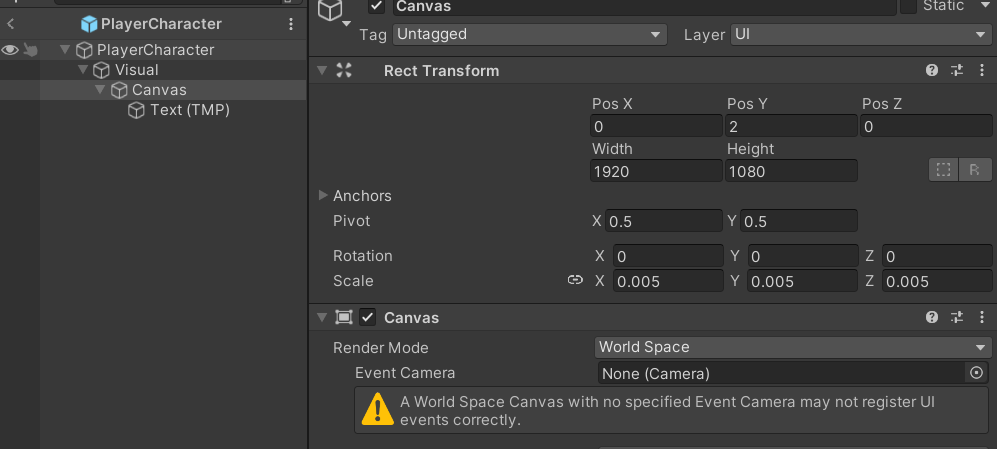
- In PlayerCharacter prefab, on the
Visualtransform, add aUI > Text - TextMeshPro. - It might asks you to
Import TMP Essentials, import it and close the window afterwards. - Change the
CanvasRender ModefromScreen Space - OverlaytoWorld Space. - Position your canvas to be
Pos X:
0Pos Y:2 - Change the canvas scale to
0.005for all axis.
- In your text component, change font size to
128, and middle & center alignment. Make sure your text now is in the center.

PlayerCharacterNametag
- Create a new script and name it
PlayerCharacterNametag. - Change parent class to
NetworkBehaviour. - Create a network property named Nickname and give it the type of
NetworkString32(stringworks too, however you should always use NetworkString asstringcan't work as an RPC parameter or a struct field).
RPC Implementation
We're going to set the RPC source to InputSource and the target to Owner (Server/Host). This means only the input source peer is able to call this RPC, but only the server will execute the RPC. We also want to set isReliable to true, this will ensure that this RPC will arrive to the server, even if packet loss occurs.
using UnityEngine;
using Netick;
using Netick.Unity;

public class PlayerCharacterNametag : NetworkBehaviour
{
    [Networked] public NetworkString32 Nickname { get; set; }

    [Rpc(source: RpcPeers.InputSource, target: RpcPeers.Owner, isReliable: true)]
    public void RPC_SetNicknameRandom()
    {
        Nickname = new NetworkString32($"Player_{Random.Range(1000, 9999)}");
    }
}
Calling the RPC
RPCs can be called from any place. We're going to call them from inside NetworkUpdate (not to be confused with NetworkFixedUpdate) which is just a regular Unity Update.
We only want to call the RPC if we have the input authority and if we press the Enter keycode.
public class PlayerCharacterNametag : NetworkBehaviour
{
    //....

    public override void NetworkUpdate()
    {
        if (IsInputSource && Input.GetKeyDown(KeyCode.Return) && Sandbox.InputEnabled)
        {
            RPC_SetNicknameRandom();
        }
    }

    //...
}
Nickname OnChanged
Then, we're going to use an OnChanged callback for our Nickname:
public class PlayerCharacterNametag : NetworkBehaviour
{
    //...
    public TMP_Text TextNametag;
    //...

    [OnChanged(nameof(Nickname))]
    private void OnNicknameChanged(OnChangedData onChangedData)
    {
        TextNametag.SetText(Nickname);
    }

    //...
}
Assign the TextNametag with the TextMeshPro UI we have created before.
Final Testing
Let's press the Enter key repeatedly to check if the RPC is working.
